

How to Track Contacts on Android – View Contact List
The contact tracking software by Snoopza is a monitoring app that runs in the background and tracks contacts and other information from mobile devices on Android. It’s free to use.
 Check Contacts
 Track Calls
 Manage SMS
 Snapchat Tracker
 Facebook Tracker
 WhatsApp Tracker
 Viber Tracker
 Screenshots
 Track Camera
 Track Internet History
 Detect SIM Card Replacement
 Keylogger
How to track contacts using Snoopza
Track contacts – it’s simple with special contact tracking software. Snoopza is a great example of such software. It’s a modern monitoring app that can help solve many problems. This software can:
- Save calls;
- Track contacts (and also save them);
- Monitor SMS, monitor WhatsApp, Facebook and other messengers;
- Control GPS location.
The app offers many functions. Most of them are useful for parents and business owners and anyone who doesn’t know how to track phone contacts.
Choosing the best contact tracking software
Snoopza is a useful mobile tracker that notifies you when new contacts are saved in the address book. This application lets you know not just the name of the new contacted, but also his/her number and the date the contact was added.
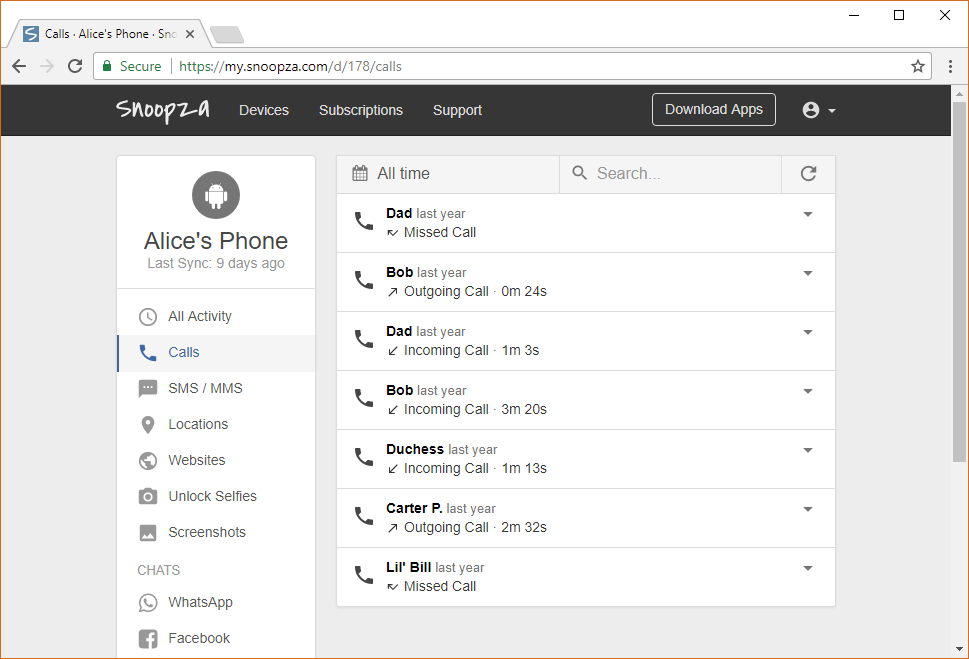
Follow these three steps and you will be able to track contacts:
- Create an account and log in;
- Download the Snoopza contact tracking software (it’s free);
- Install.
Then you can start tracking contacts. You’ll find all recorded data in your own account online. There, you will see all tracked contacts. It’s a convenient way to access your data whenever and wherever you want.
It’s not difficult to understand how this Android monitoring application works. When the monitored user adds new contacts to his/her phone, they will be saved and can be viewed in your online user panel. Sometimes the details are sent with a little delay. Don’t worry; it’s not a big problem, just a feature of the technology. Sooner or later you will get all the information you need: phone number, name, e-mail and so on.
In addition to the contacts, Snoopza can save any interactions with the contact list. This is a default feature; you won’t need to change your settings. Moreover, you don’t need to have any special knowledge in computer science or do anything difficult; the process is very easy. Register, download the app, install and start collecting data.
All procedures are carried out in the background so the app can’t be disabled, while the monitored user has been informed it is installed. This creates many ways to use this software responsibly. The stories of children and employees who were kept safe because someone who cared about them used monitoring show that this application can be very useful.
Why is it so important to track contacts?
Why and how to use the tools is up to you. Maybe you wish to know whom your children are talking to. Maybe you need to manage company devices used by your employees. Whatever your reason, with a special tool like Snoopza, you have a lot of possibilities. For example, you can learn a SIM card location or distantly take a screenshot on Android.

When tracking a phone’s activity, it’s useful to get the names of the conversation partners as well as mail addresses. This can help solve many problems.
Any additional information is useful when parents want to protect their teens or kids from harm. It’s essential to know everything that is happening with the monitored device. No business owner wants to lose profit. Many people need Snoopza, and there are many reasons why:
- It can give you an opportunity to learn everything about the new contacts of your children and employees.
- It helps you keep your children safe and your company devices accountable. Monitoring helps you avoid problems.
- It is your chance to protect your child from a scam.
- It’s the easiest way to learn how company devices are being used. Maybe your workers are trying to share confidential information.
A monitoring application Snoopza is used to track contacts to prevent bad situations or provide help. For example, you can help your children stay safe.
Start tracking right now. It’s an easy way to improve your contact management. On average, an adult has 100+ contacts in his/her phone. Every year, this list grows by several names and phone numbers. After a while, it’s hard to deal with it. You can organize your data and also follow the updates to someone’s phonebook.
Family Safety & Parental Control
Always at Hand.
Our modern child safety app for Android helps you know your children's real-time location, giving you peace of mind in any situation.
Try for Free
New feature: AI Grok and New feature: AI Deepseek