

Cell Phone Tracker — Background Mode
Background mode by Snoopza lets the tracker keep running to record SMS, call history, contacts, locations, camera, audio, internet activity, Instagram, WhatsApp, Viber, Facebook, Skype and Telegram.
 Track Calls
 Manage SMS
 Snapchat Tracker
 Facebook Tracker
 WhatsApp Tracker
 Viber Tracker
 Screenshots
 Check Contacts
 Track Camera
 Track Internet History
 Detect SIM Card Replacement
 Keylogger
Snoopza — a useful free cell phone tracker for parents and employers
Would you like to download one of the best free cell phone trackers for Android? This is not an easy task because you must research all the options and find the best free one. Save time and choose Snoopza. It’s a free monitoring app for Android. It runs in the background and can be used for recording SMS, call history, contacts, locations, camera, audio, internet activity, Instagram, WhatsApp, Viber, Facebook, Skype and Telegram.
How to recognize a fraudulent cell phone tracker
Be careful, as a lot of scam offers are on the software market. The best free trackers for Android are sometimes fake or useless. You must remember such facts:
- The real cell phone tracker never requires just a phone number to start monitoring the cell phone;
- If the official webpage looks unprofessional, it’s probably a fake one;
- Only one payment option shows in 80%, it’s a scam.
Pay attention to the details (e.g., payment options, agreements and so on).
It’s no surprise that there are lots of real but useless offers. Choose a proven solution — Snoopza. This monitoring app can be helpful in many situations. Why? There are many reasons. The best way to learn all of them is to use this application yourself.
Background mode – how monitoring keeps working
A monitoring app such as Snoopza can run in the background. This means it keeps working without interrupting the person who uses the device, so a child or an employee can’t simply switch the monitoring off. We are speaking not about a hidden phone number but about a reliable feature. The user of the device should be informed that monitoring is in place.
The background operation mode can be turned off or on during the cell phone tracker installation. If you want to make sure the tracker keeps running, don’t forget to activate it.
Both children and employees may not realize that they’re doing something risky. Using software, you’ll get the most accurate information. Maybe it’ll help protect your teens or save your business.
You can take any situation into your hands.
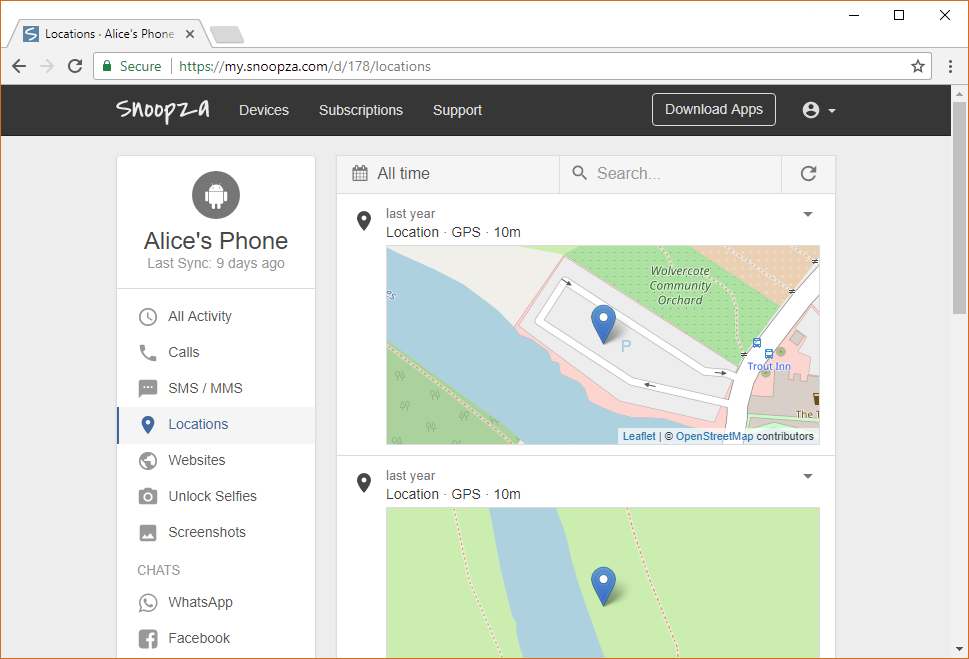
What can the Snoopza tracker app do?
Snoopza has many features. It gives you the opportunity to:
- Monitor all SMS and other messages;
- Check on different online chats;
- Capture browser history and Internet activity;
- Track GPS locations in real time;
- Transfer media information;
- Monitor social networks;
- Control the phone remotely.
It’s free and it keeps working in the background.
A GPS tracker app such as Snoopza gives you a chance to see the current location of the target phone on the map, or its last position when the device connection was active. When something happens, the server generates and sends notifications with a pop-up window or via e-mail. It’s useful, for example, if you have lost your device or if it has been stolen.
Follow three steps to use one of the most useful tracker apps:
- Firstly, sign up for a free account by entering your password and email.
- Secondly, download the app and install it.
- Thirdly, start tracking phone activities. Don’t forget to log into your web account.
The most important step: After downloading the app, you’ll have to type a PIN (personal number). You’ll find it in your user panel online. It will give you the opportunity to launch the application and access all data wherever and whenever you want. With this code, you’ll be able to delete the software or change the settings. It’s simple and easy to use. Try it!
Family Safety & Parental Control
Always at Hand.
Our modern child safety app for Android helps you know your children's real-time location, giving you peace of mind in any situation.
Try for Free
New feature: AI Grok and New feature: AI Deepseek